Create an xDelta patch
Inno Setup XDELTA Patch Maker is an easy-to-use utility for creating update patches for different types of applications. You can use it for small updates, such as minor adjustments or bug fixes, as well as larger changes.
Installation
- Download Inno Setup XDELTA Patch Maker using the link below.
- Extract it. The full path to the folder must be fewer than 30 characters, for example
C:\ISXPM. - Open the extracted folder and run
isxpm.exe. - Once the program is open, let's move on to the configuration.
Configuration
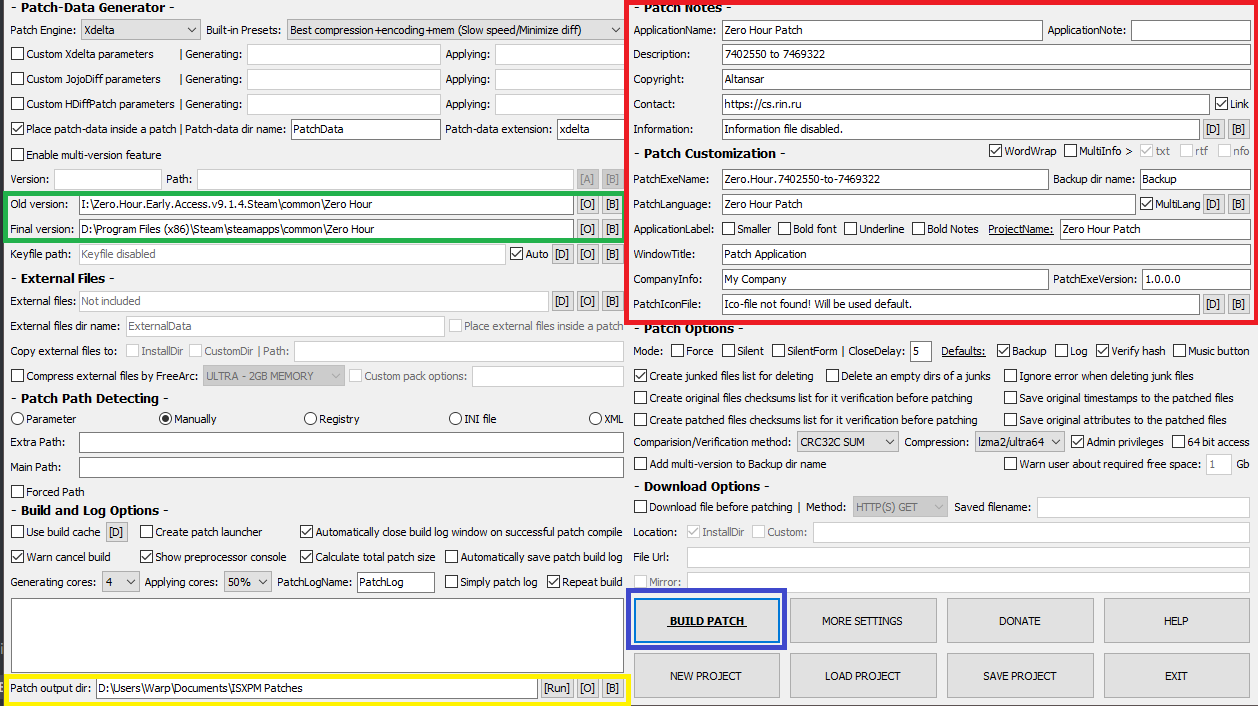
Green box: Old Version is the old version of the game. New Version is the new version (labelled Final version in the screenshot).
Red box: these details will appear in the patch's .exe, such as its name. The field names are fairly self-explanatory. They are optional, but it is better to fill them in when you can.
Yellow box: this is the folder where the patch's .exe will be created.
Blue box: once you have filled in everything you want, click BUILD PATCH to create the patch. This can take some time; do not close the program.
Installer in French
You can change the language of the xDelta installer. French is not included by default in the version shown here. To make your generated executable use French, follow the steps below.
The original tutorial's French .ini was hosted on Uptobox and is no longer available there. These steps require that file; no replacement download is provided here.
- Get the compatible French language
.inifile if you still have a copy. - Open the xDelta installation folder, then the
langfolder, and place the.inithere. - When creating your xDelta patch, go to
Patch Customization, findPatchLanguage, click theBbutton on its right and select the.ini.

Going further
There are many other options, such as the compression method, that we cannot cover in this beginner's guide. To go further, read RessourectoR's guide dedicated to this subject.